Work on production.Without the fear.

Flare asks before anything writes to production, records every change, and can undo a changed row, document or key. One desktop app for Firebase, SQL, MongoDB, Redis and S3.

Someone changes an order on the production database.

Flare catches it, before it becomes a story.

A query on the wrong database takes a second, and the way back is a restore, if there is one. Flare puts three things in the way, on every database it opens.

  1. 1

    Production asks first.

    Anything that writes to production asks before it runs. Deleting data, or changing more than a hundred rows at once, needs the environment's name typed.

  2. 2

    Every change, with a way back.

    The activity log keeps what each change was and is. Undo puts rows, documents and keys back, wherever it can do so exactly.

  3. 3

    Read only, where it should be.

    On Team and up, each teammate gets read, write or deploy access per environment, and connections can be shared without their passwords.

Every database, the same screens.

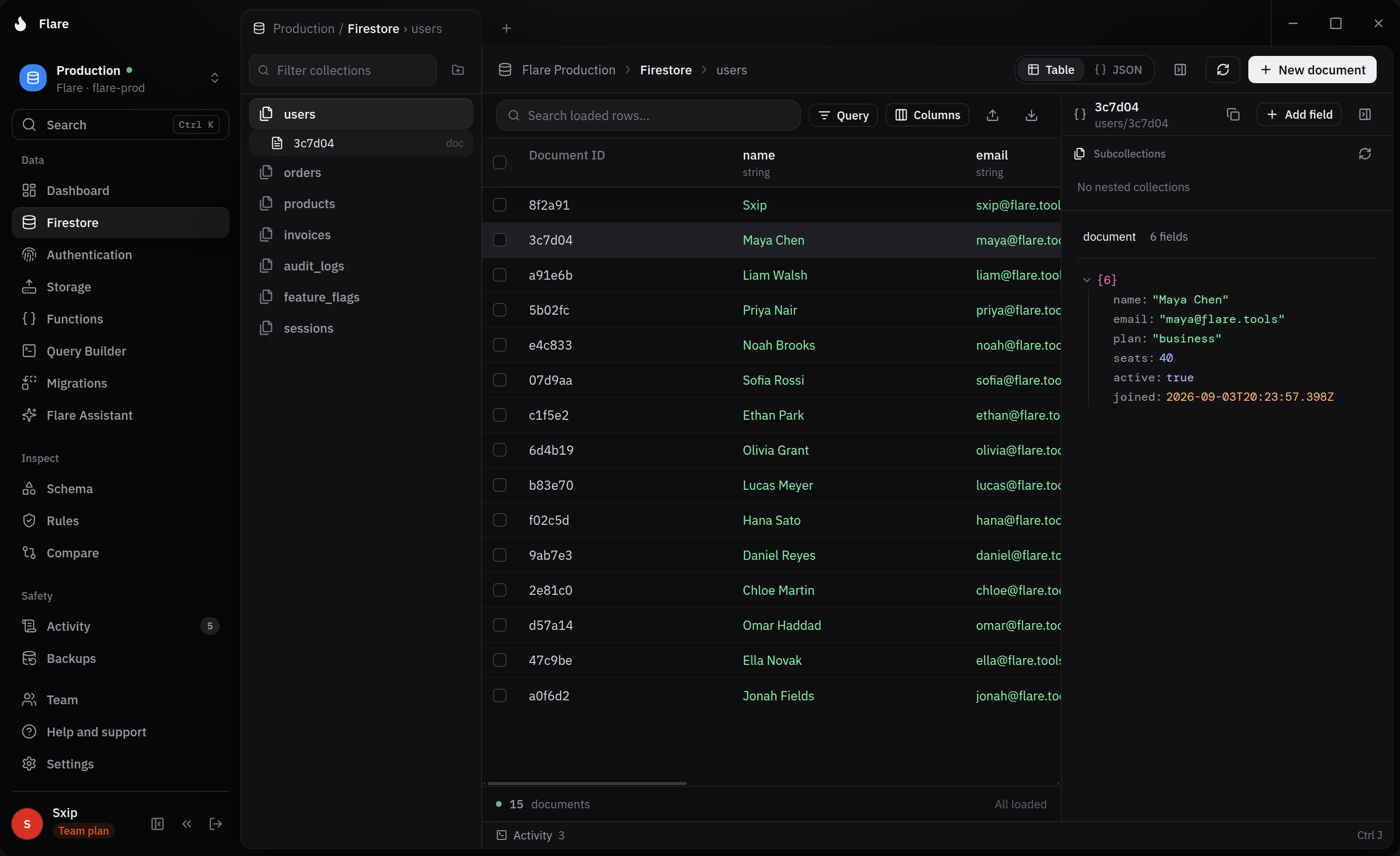
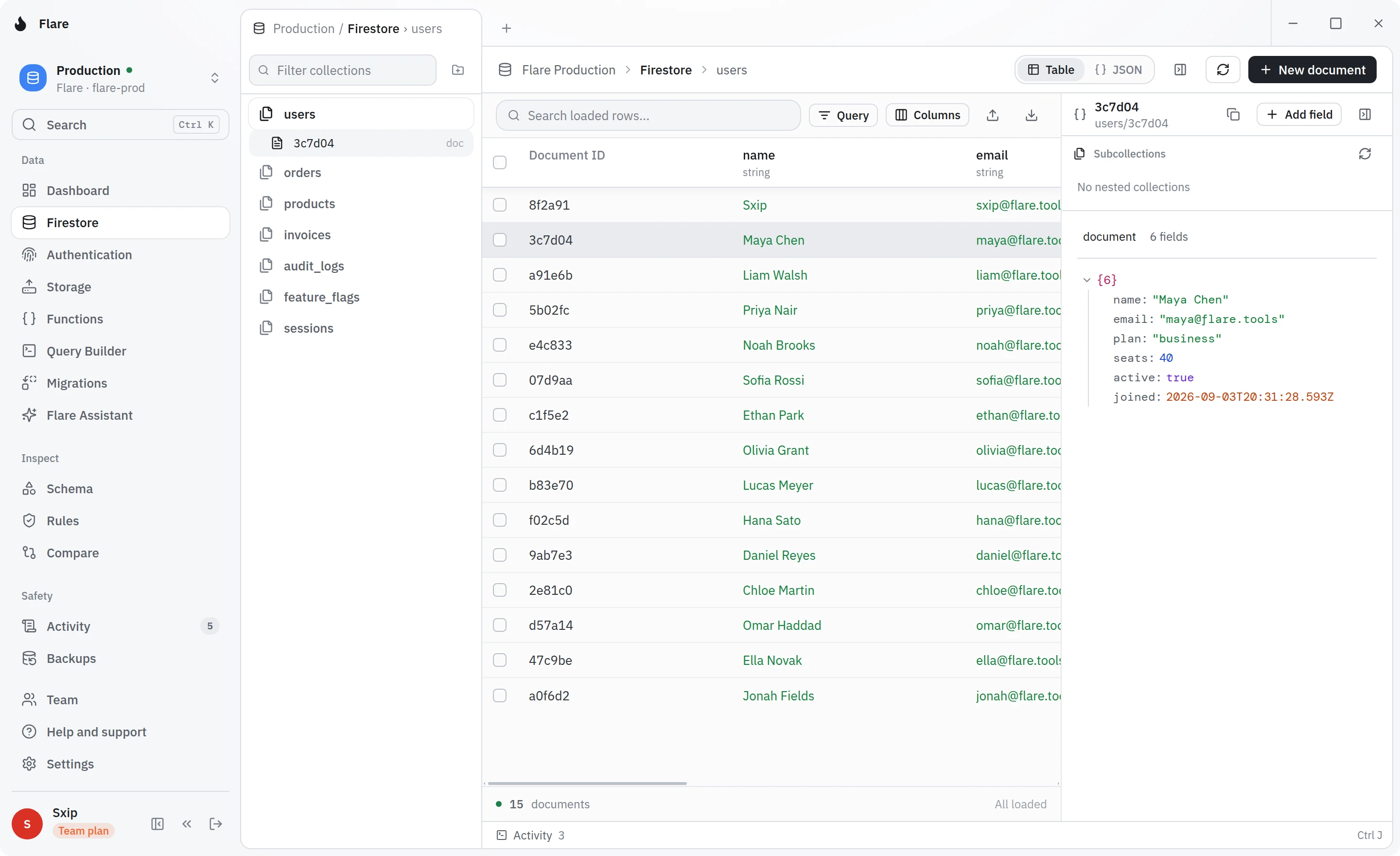
Firebase, PostgreSQL, MySQL, SQLite, Redis, Supabase, MongoDB, Cassandra and S3 storage, in one app. Each gets its data, a query editor, schema, migrations, backups and compare, as far as the database allows.

  • Browse and edit Firestore, and manage Auth users, Storage, Functions and security rules, on the emulators too. Tools: Dashboard, Firestore, Query Builder, Schema, Migrations, Flare Assistant, Authentication, Rules, Functions, Storage, Compare, Backups, Activity.
  • Browse and edit tables, run SQL, and manage roles and row level security policies. Tools: Dashboard, Tables, Query Editor, Schema, Migrations, Flare Assistant, Roles, Policies, Functions, Compare, Backups, Activity.
  • Browse and edit tables, run SQL, and manage users and their grants. Tools: Dashboard, Tables, Query Editor, Schema, Migrations, Flare Assistant, Users, Grants, Functions, Compare, Backups, Activity.
  • Open a database file on your computer, edit its tables and run SQL. Tools: Dashboard, Tables, Query Editor, Schema, Migrations, Flare Assistant, Functions, Compare, Backups, Activity.
  • Browse keys by namespace, run commands, and manage ACL users and their rules. Tools: Dashboard, Keys, Console, Schema, Migrations, Flare Assistant, ACL users, ACL rules, Functions, Compare, Backups, Activity.
  • Edit its Postgres tables, and manage Auth users, Storage, Edge Functions and row level security. Tools: Dashboard, Tables, Query Editor, Schema, Migrations, Flare Assistant, Authentication, Policies, Functions, Storage, Compare, Backups, Activity.
  • Browse and edit documents, run find and aggregation queries, and manage GridFS files, users and roles. Tools: Dashboard, Collections, Query Builder, Schema, Migrations, Flare Assistant, Users, Roles, Functions, Storage, Compare, Backups, Activity.
  • Edit tables and their partition and clustering keys, run CQL, and manage roles and permissions. Tools: Dashboard, Tables, Query Editor, Schema, Migrations, Flare Assistant, Roles, Permissions, Functions, Compare, Backups, Activity.
  • Browse, upload and compare files in buckets on AWS S3, Cloudflare R2, MinIO and more. Tools: Storage, Compare, Backups, Activity.
The Flare workspace: a Firestore collection open as a table, with the document inspector beside itThe Flare workspace: a Firestore collection open as a table, with the document inspector beside it

Flare Assistant writes the query into the editor from plain words. It never runs anything itself.

Start free. Upgrade when you need more.

Every plan opens every database. Solo adds unlimited saved connections, Backups and Compare; Team adds running migrations and what a team needs to share the work.

Team size
3

Free

One person, getting started

Free

No card required.

Join the waitlist

Includes

  • Every database, with the tools to browse, query and change its data
  • 3 saved connections
  • 10 Assistant requests / month
  • Build and check migrations
  • Encrypted sync across your computers

Solo

One developer who ships

$10/ month

Renews monthly. Cancel anytime.

Join the waitlist

Everything in Free, and

  • Unlimited saved connections
  • Backups and schedules
  • Compare two environments
  • 3 Flare projects to group your environments

Business

From 10 seats

$16/ seat / month

$160 for 10 seats.

Join the waitlist

Everything in Team, and

  • Audit export, and a year of shared activity
  • Unlimited widgets on each dashboard
  • 600 Assistant requests / month
  • Priority support and an onboarding call

More than 200 seats? Talk to us

Compare every plan

Compare plans

Every plan side by side. What you see here is exactly what each plan unlocks.

What each Flare plan includes
Included Team
Workspace
Every databaseFirebase, PostgreSQL, MySQL, SQLite, Redis, Supabase, MongoDB, Cassandra and S3 storage
Tools for your dataDashboard, Data browser, Query Editor, Functions, Storage, Schema, Users and rules and Activity
Limits
Saved connectionsYour own. Team environments and team folders do not count
Flare projectsNamed groups of environments, such as dev, staging and prod
Seats
Widgets on each dashboardYour own dashboard, on each database
Assistant requests a month
Shared activity kept
Teams
RolesFrom viewer to owner
Access per environmentRead, write or deploy, on every database
Firestore migrations that delete dataStay with admins
Features
Flare Assistant
Build and check migrations
Encrypted sync across your computers
Backups and schedules
Compare two environments
Roles, shared queries and environments
Encrypted team folders
Run and reverse migrations
Audit export, and a year of shared activity

Prices exclude VAT and are quoted from Stripe, so this is what checkout charges. Team from 3 seats, Business from 10.

Is my data sent to Flare?

No. Flare talks to your databases straight from your computer, and to Google for Firebase, so your rows, documents and files never pass through Flare's servers. Your saved connections and their passwords stay on your computer. If you turn on sync, or share a connection in a team folder, it is end to end encrypted on your computer first, so Flare's servers only hold what they cannot read. What does reach Flare is what you choose to share with a team in the clear, such as saved queries, migrations and activity, and what you send to Flare Assistant: your question and the shape of your tables, and no rows unless you choose to send them.

Everything Flare keeps, in the privacy policy
What can Flare do with my Google account?

You connect a Google account in the app to work with your Firebase and Google Cloud projects; your other databases do not need one. Flare asks Google for access to list the Firebase projects your account can reach, and to read and change the Firestore data, Authentication users, Storage files, Security Rules and Cloud Functions you open. It can only do what your account can already do, only when you ask, and it never changes who has access to your projects in Google Cloud. Your Google sign in stays on your computer and is never synced.

How Flare uses Google data, in the privacy policy
What happens when I work on production?

You tag each database as development, staging or production, and Flare holds production to stricter rules. Anything that writes there asks first. Deleting data, changing more than a hundred rows, documents or keys at once, or restoring a backup there asks you to type the environment's name. Every change goes into the activity log, and a changed row, document or key can be undone wherever Flare kept what it needs to put it back exactly. None of this replaces the database's own permissions, which still decide what your account can do.

Which databases does Flare work with?

Firebase, PostgreSQL, MySQL, SQLite, Redis, Supabase, MongoDB, Cassandra and S3 storage. S3 means AWS S3, Cloudflare R2, MinIO, or another service that speaks the S3 API. Each one gets the same screens, as far as the database itself allows: its data, a query editor, schema, migrations, backups, compare and Flare Assistant. Many more databases are on the way.

What does Flare cost?

The Free plan is free for as long as you use it: every database, with the tools to browse, query and change its data, Flare Assistant, sync, and 3 saved connections. There is no trial. Upgrade for as many connections as you like, Backups and Compare from Solo, running migrations from Team, or to share the work with a team.

Your next production change, without the fear.

Flare is not open to everyone yet. Leave your email and we will tell you when it opens.